Track sales VAT
Keep taxable sales and the VAT charged on them clearly organised. Review your sales tax totals for the selected period and give your finance team a consistent starting point for reconciliation.

Bring VAT tracking, tax reporting and ZATCA e-invoicing into your everyday workflow. Tranz helps you manage tax across sales and purchases, review adjustments and keep your business ready for its next tax review.
Explore tax management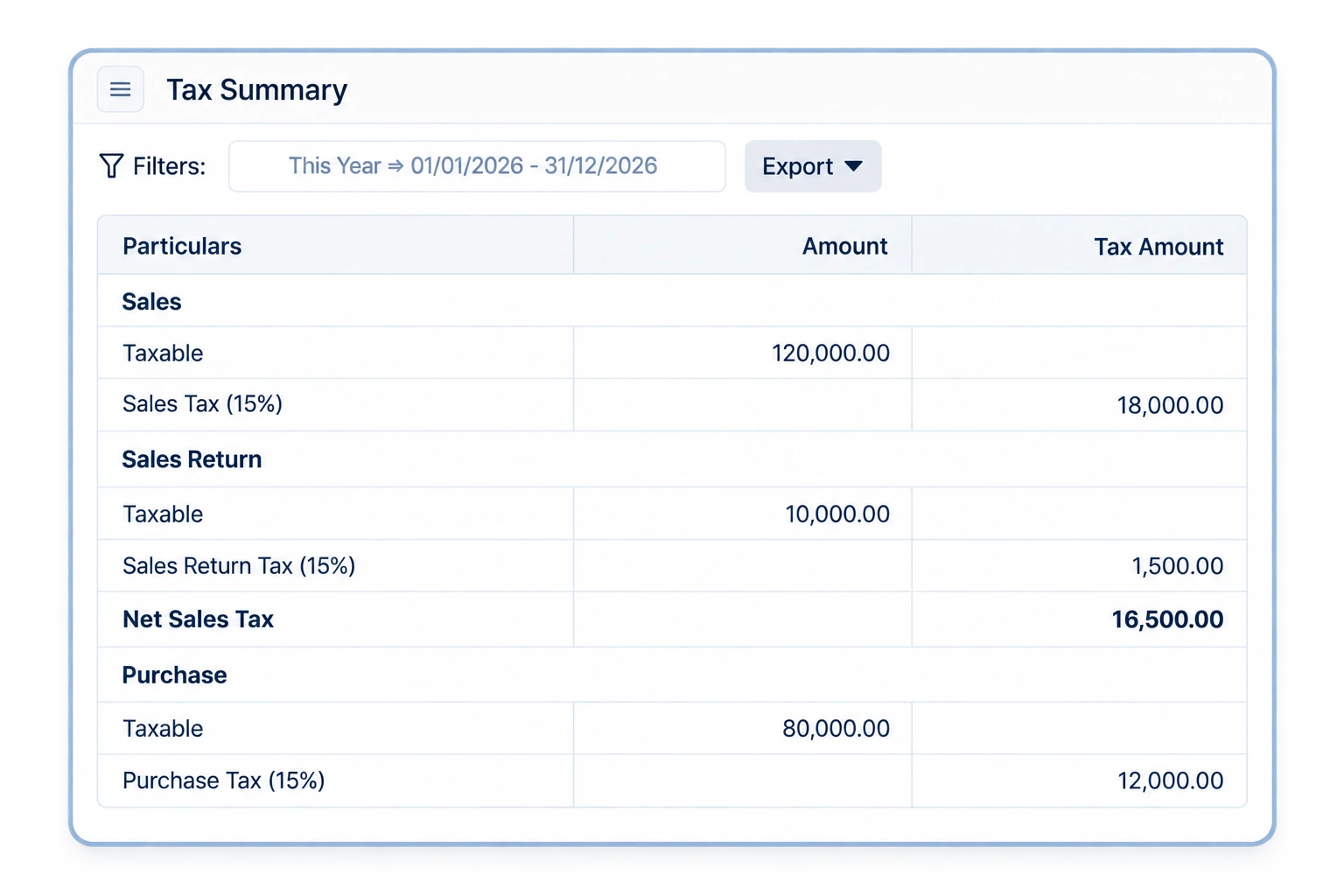
Stay on top of your VAT figures with a consolidated Tax Summary. Tranz brings taxable sales, sales returns and purchase tax together, helping your team review the period’s activity and prepare the figures needed for tax reporting.
Keep taxable sales and the VAT charged on them clearly organised. Review your sales tax totals for the selected period and give your finance team a consistent starting point for reconciliation.
See how sales returns affect your tax totals. Tranz presents return tax alongside sales VAT and net sales tax, helping you include adjustments in your period-end review.
Bring taxable purchases and purchase tax into the same reporting view. Give your accountant the visibility needed to reconcile supplier transactions and assess eligible input VAT.
Manage tax details alongside the transactions that drive your business. Tranz keeps taxable amounts, discounts and VAT totals visible across your sales and purchase documents, helping your team maintain clear, consistent records.
From customer invoices to supplier bills and credit notes, keep the information needed for tax review within your accounting workflow.
Explore Tranz accountingPresent item values, taxable amounts and VAT totals in professional invoice layouts. Keep the tax breakdown easy for customers and your finance team to review.
Record purchase bills with supplier references and tax amounts. Review the VAT associated with your purchases alongside the vendor records behind them.
Manage credit notes with transaction references, item details and tax amounts. Keep the reason and value of an adjustment available when reviewing customer or supplier activity.
Keep everyday transactions and period-end tax reporting in one accounting workspace.
Make ZATCA submission part of your invoicing workflow. Tranz lets you choose between automatic and manual sending, so your team can use the approach that fits its invoicing process.
Enable automatic sending to submit invoices to ZATCA automatically, or leave it off and send invoices manually when your team is ready.
Turn on automatic sending to have Tranz send invoices to ZATCA without a separate manual send action for each invoice. Reduce repetitive submission work as your team handles day-to-day billing.
Keep automatic sending switched off to send invoices to ZATCA manually. Give your team control over the send action as part of its invoice review and submission process.
Give your finance team an organised foundation for compliance work. With transaction records, tax summaries and accounting reports in Tranz, the information needed for reconciliation and return preparation is easier to find and review.
Keep invoice and bill references, dates, taxable amounts and tax totals together. Review the details behind sales, purchases and adjustments without losing the context of each transaction.
Review your Tax Summary alongside sales, purchase and accounting reports. Help your team investigate differences and check the figures before completing its period-end tax review.
Select the period you need and export your tax summary for your accountant. Provide an organised set of figures to support VAT return preparation and review.
Tranz supports your record keeping and reporting workflow. Your finance team remains responsible for reviewing tax treatment, input VAT eligibility and the final VAT return.
Explore Tranz reportsFind the Tranz setup that fits your business. Contact our team to confirm tax and e-invoicing availability for your chosen platform.
Compare platformsEverything you need to know to manage your business smarter, all in one place.